Quicken Alternative
Still a desktop app. Still your own register. Now it shows you what's coming.
Go through the "best Quicken alternatives" lists and every one of them puts a phone app with a web dashboard in the top slots. Desktop options do appear, but near the bottom, and they're the same three programs that have been there for twenty years. TinyCashflow is a real desktop application with a wide window and a dense list, built for people who type their transactions in themselves and want to know what their balance will be next month, not just what it was last month.
Try it free in your browser →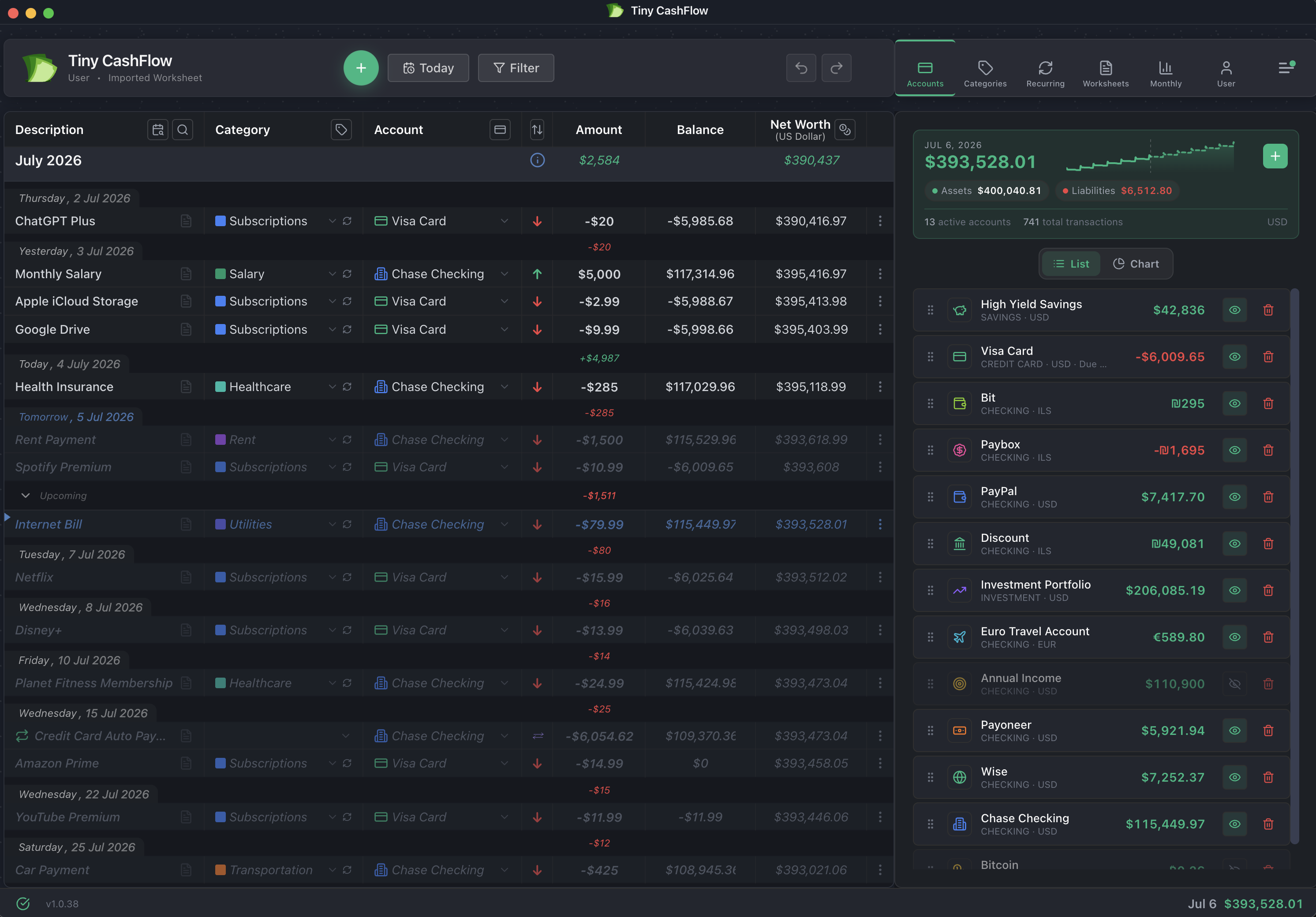
Three things to know before you read further
- There is no bank connection, by design. TinyCashflow never asks for a bank login and has no feeds. You enter transactions yourself. If automatic downloads are the reason you use Quicken, stop here, this isn't for you.
- Your Quicken file does not come across. There is no QDF, QIF or CSV import yet. People generally start from today's balances and keep the old file in Quicken for history.
- It is not all of Quicken. No investment lot tracking, no loan amortization, no bill pay, and no tax forms or accountant exports. It's the register and the forecast, done properly.
We'd rather lose you on this page than after you've spent an evening typing in your accounts.
The short version
Choose TinyCashflow if you were mostly using Quicken as a checkbook register with a balance at the bottom, you want that on a modern desktop app that also projects the balance forward, you'd rather not hand your bank credentials to anyone, or you live somewhere Quicken doesn't sell.
Stay with Quicken if you rely on downloaded transactions, investment and tax reporting, decades of history you need inside the app, or reconciling line by line against a statement.
Side by side
| TinyCashflow | Quicken Classic | |
|---|---|---|
| Real desktop app | Yes, Mac & Windows, plus web and a mobile companion on the same data | Yes, Windows & Mac, the original desktop finance software |
| Forward view of your balance | Built around it, recurring income and bills are already projected on the same list you scroll | Projected balances exist, but the register is the past and the forecast lives elsewhere |
| Bank connection | None, deliberately, no credentials, nothing to breach | Yes, downloads from thousands of US and Canadian institutions |
| Manual entry as a first-class workflow | Yes, that's the whole design, keyboard-first, math in the amount field, undo everything | Yes, the register has always supported it |
| Pending vs. cleared | No flags to maintain, position on the timeline is the status, see below | Yes, the Clr column and the reconcile flow |
| Import your existing Quicken file | No, QDF, QIF and CSV import aren't supported | n/a |
| Works outside the US & Canada | Yes, anywhere, any currency | No, Quicken states it doesn't offer products outside the US and Canada, and supports English system settings only |
| Multi-currency, including crypto | Yes, per account and per transaction, totals in whichever currency you pick, historical rates kept | Built around USD and CAD |
| Works fully offline | Yes, local database, cloud sync is optional and off by default on desktop | Data is stored locally, though the subscription and online features need a connection |
| Investment lots, loan amortization, tax forms, bill pay | No, accounts, transactions and net worth | Yes, this is where Quicken is genuinely deep |
| Tagging deductible expenses & business revenue | Yes, tag any transaction, with running annual totals, included in the one price | Business tagging and reporting live in Classic Business & Personal, the top tier |
| Tax payments, estimated tax, quarterly VAT | Entered as ordinary recurring transactions, so they show up in the forecast like any other bill | Tax-line assignment and reports, aimed at filing rather than forecasting |
| Setup before the numbers mean anything | Minutes, no wizard, no account linking, no category mapping, no reconciling, type your balances and the forecast is already there | Longer, accounts to link, categories to map, reconciliation to catch up |
| Price | $6/mo billed yearly ($72/yr), or $9/mo monthly · free local desktop tier | Annual subscription, Classic Deluxe advertised from $6.99/mo billed annually as a first-year offer, renewing at the then-current rate |
| Free trial | 30 days, no credit card | Money-back guarantee rather than a trial |
| If you stop paying | Drops to the free tier, your data stays and the desktop app keeps working locally | Data Access Guarantee: view, edit, export and manual entry continue, downloads and online features stop |
Quicken details are taken from Quicken's own published pricing and support pages as of August 2026. Promotional pricing changes often, check quicken.com for today's numbers.
If you keep your own register, this was built for you
There's a particular kind of person Quicken created and nobody sells to anymore: someone who sits at a computer, keeps a transaction list by hand, knows every line in it, and would rather type an entry than have an aggregator guess at it. Every current "Quicken alternative" list leads that person to a phone app whose main selling point is that it connects to their bank and categorizes things for them, which is precisely the part they didn't want. Scroll far enough and you'll find a desktop program or two, but they're the survivors of an earlier era rather than anything built recently. TinyCashflow starts from the opposite assumption: you're the source of truth, the app's job is to add up what you told it and show you where it lands.
The part a register can't do on its own
A register tells you where you've been. The question people actually have is whether rent clears before the paycheck lands, and what's left in March after the insurance renewal. In TinyCashflow that isn't a separate report, it's the same list: scroll up for history, cross Today, and keep scrolling into a future where your salary, rent, subscriptions and one-off plans are already placed and already added up. Net worth sits in the footer the whole time and updates as you type. Nothing to configure to get there.
The complaint that actually pushes people out
Read the threads where long-time Quicken users announce they're done, and it usually isn't the price. It's speed. People describe waiting seconds after pressing Enter, updates that take half an hour, a register that got slower every year they stayed loyal. The punishment lands hardest on exactly the people with the most history in the file.
TinyCashflow's timeline only ever renders the rows on screen, so scrolling costs the same whether you're holding a few hundred transactions or tens of thousands, and the balance is recalculated off the main thread so typing doesn't wait for it. In fairness, we're a young product and nobody has thirty years in it yet, so treat that as an architectural claim rather than three decades of proof. But it's the part we designed for first.
Where "pending" and "cleared" went
In Quicken you mark a transaction cleared once the bank posts it, because the register on its own can't tell what's real yet from what's still in flight. TinyCashflow doesn't have that column, and after a week you stop reaching for it. Everything dated ahead of today is what's coming, everything behind today is what happened, and the running balance already treats them differently, so the thing the flag was there to tell you is simply where the row sits. Nothing to tick, nothing to forget to tick, and no register that quietly drifts because you stopped keeping the marks up to date.
The one habit that doesn't carry over is reconciling line by line against a paper statement. If that monthly ritual is how you trust your numbers, you'll feel its absence.
Any currency, anywhere
Quicken is explicit that it doesn't sell outside the United States and Canada, and that it supports English-language system settings only. If you have a euro account, a shekel salary, a Wise wallet or some crypto, that's not a limitation you can work around, it's the product. TinyCashflow treats currency as an ordinary property of an account and a transaction: hold accounts in as many currencies as you like, view every total in whichever one you think in, and switch at any time. Historical exchange rates are kept, so past balances stay correct rather than being retroactively rewritten by today's rate.
About the price, honestly
Quicken Classic is a subscription now, advertised at a discounted first-year rate that renews at whatever the price is when it renews. TinyCashflow is $6/month billed yearly, $72 a year, or $9 a month if you'd rather pay monthly, and there's a free desktop tier that keeps one worksheet locally with the core features and no time limit. On a first-year promotion the two land in similar territory. The difference is what you're buying: Quicken sells you bank feeds, investment tracking and tax reporting, and prices accordingly. We sell you a register and a forecast, and price accordingly. If you're paying a Quicken subscription and using a fraction of it, that's the comparison worth making.
When you should stay with Quicken
If downloaded transactions are the reason you open the app, stay. If you track investment lots, cost basis or tax schedules, stay, we don't do any of that. If twenty years of history has to live inside the software rather than in a file you keep, stay, we can't import it. And if reconciling line by line against a statement is how you trust your balance, stay, because we replaced that ritual rather than reproducing it. Quicken has been at this since 1983 and is still the most complete personal finance package sold. TinyCashflow is deliberately a much smaller thing, done well.
See where your balance lands, without a bank login
Open it in your browser, type in a few balances, and scroll into next month. No credit card, no signup pressure, nothing to connect.
Try TinyCashflow Free →Also available as a desktop app for Mac and Windows.